

Best Donor Management Software: I Tested 10, Recommend 6

Running a nonprofit is hard enough without having to spend hours managing donor data.
When I first started helping nonprofits build their websites, I quickly realized that many organizations were drowning in disorganized data. They’d have donor information scattered across Excel files, email inboxes, and even handwritten notes.
That chaos could be costing you time, money, and momentum.
That’s where the right donor management software comes in. This isn’t just a fancy address book – it’s the tool that helps you automate thank-you emails, track pledges, spot key fundraising trends, and generate accurate reports that actually make sense.
To cut through the noise and find the true winners, I put 10 leading donor management platforms to the test. I checked their pricing, core features, how easy they are to use, and whether they can actually help your nonprofit raise more money.
Based on these results, here’s my top 6 recommendations for your nonprofit.

Quick Pick – The Best Donor Management Software for Nonprofits
| Product | Starting Price | Best For | Key Feature |
|---|---|---|---|
| WP Charitable | Free (Lite) | Full control + zero platform fees | Easy donor management in WordPress |
| Bloomerang | $40/month | Donor retention | Rich donor profiles with giving patterns and capacity insights |
| Donorbox | Free with transaction fees | Small organizations that need a fast setup and checkout experience | Start collecting donations in minutes with zero technical configuration |
| DonorPerfect | Contact for quote | Comprehensive donor lifecycle management | Customizable fields for detailed donor tracking |
| GiveWP | Free (Lite) | Established nonprofits needing a built-in CRM | Built-in donor database with complete WordPress integration |
| Little Green Light | $45/month | Small teams managing complex donor databases | 360-degree view of your supporter relationships |
| Keela | $144/month | Data-driven AI insights | AI-powered donor behavior analysis |
| Virtuous | Contact for quote | Automated donor communications | Marketing automation integrated with CRM |
| GiveButter | Free (Plus at $29/month) | Grassroots organizations on tight budgets | Free platform with unlimited donation forms |
| goDonate | Contact for quote | Large, UK-based nonprofits | Supports over 50,000 donations per hour |
Why Use Donor Management Software?
Donor management software can completely change how your nonprofit operates. It’s the difference between spending hours digging through spreadsheets and having instant access to organized, actionable donor information.
If you’re worried you’ll forget to thank a major donor or lose track of who gave last year, then you’ll almost certainly benefit from a good donor management system.
Here’s a look at what this software can do for you:
- Saves time: Many donor management systems can automatically send things like thank-you emails and receipts, which means you’re doing way less manual work. This gives you more time to focus on the actual fundraising efforts that truly move your mission forward.
- Increases donations: With the right reports and analytics, you can spot important trends and identify the perfect time to follow up with a supporter. I’ve seen many organizations significantly increase their donations just by timing their appeals better.
- Improves relationships: By creating a complete donor history, the right system can help you personalize your outreach and make every person feel valued. Rather than sending a generic email, you can acknowledge their past donations and build stronger, more meaningful relationships.
- Reduces errors: You won’t have to worry about lost data or forgotten follow-ups, as many processes are automated.
- Provides insights: A good donor management system will show you which campaigns are working well and which donors might be ready to give more to your cause. This is how you turn raw data into a smart, winning fundraising strategy.
Overall, the right system doesn’t just store information – it helps you use that information to raise more money.
How I Test and Review Donor Management Software
I’ve seen too many nonprofit organizations struggle simply because they chose the wrong software.
Some teams picked a system that was far too complex for their needs, while others chose platforms that couldn’t possibly grow with them, forcing a painful migration later.
That’s exactly why I don’t just read feature lists when I’m reviewing these tools. Instead, I set up real test campaigns, process small test donations, and see how the software handles day-to-day nonprofit work.
Here are the key areas I focused on while testing the donor management systems listed in this roundup:
- Setup and ease of use. I time how long it takes to get from signing up for an account to publishing your first donation form. For example, systems like Donorbox really impressed me because I could get my forms live in minutes, while other platforms required hours of confusing configuration and technical setup.
- Donor tracking capabilities. I rigorously test how well each platform stores and organizes donor information, which is essential for any great customer relationship management (CRM) app. The best tools don’t just record gifts – they analyze the data and show you key giving patterns and overall engagement levels.
- Automation features. This is a critical one. I set up automated thank-you emails, recurring donation reminders, and follow-up sequences. This can help you build real donor relationships at scale.
- Reporting and insights. I create test campaigns and then evaluate the data that each platform provides. I ask myself, ‘Can I easily see which appeals actually worked?’ and ‘Am I getting truly actionable insights, or am I just looking at raw, confusing numbers?’
- Integration options. Since no single tool does everything, I test how well each system connects with essential services like your email marketing provider, your accounting software, and other key nonprofit tools. If the integrations are poor, they create more work for you, rather than less.
My goal in all this is simple: I want to find the tools that genuinely help nonprofits like yours raise more money with far less stress.
Why Use WordPress for Donor Management?
Deciding how to track your supporters usually comes down to two choices: using a dedicated SaaS (Software as a Service) platform or a WordPress plugin.
SaaS platforms are hosted on someone else’s servers and often charge a monthly fee plus a percentage of every donation you receive. This can get expensive as your organization grows.
By contrast, using a WordPress donation plugin gives you complete ownership of your data and the relationships you have with your donors. Because the software lives on your own website, you also don’t need to worry about platform fees. This means WordPress is often the most cost-effective long-term solution for nonprofits.
To get started with WordPress donor management, you’ll need a few basic things:
- A Domain Name: This is your website’s address on the internet, such as yournonprofit.org. Wherever possible, I recommend using a .org extension because it’s the global standard in the nonprofit sector.
- Web Hosting: This is where your website’s files and donor database live. I recommend using Bluehost because it’s beginner-friendly and affordable for growing nonprofits. For other recommendations, see our pick of the best WordPress hosting.
- An SSL Certificate: You’ll need this to process payments safely. Most good hosting providers now include a free SSL certificate to encrypt your donors’ sensitive information.
- A Donation Plugin: As you’ll see in our reviews below, plugins like WP Charitable allow you to create forms, manage a donor database, and send receipts without leaving your WordPress dashboard.
1. WP Charitable – Overall Best Donor Management Software for Nonprofits

| WP Charitable Pros | ✅ Free core plugin lets you launch a professional fundraising site with zero upfront cost ✅ Drag-and-drop campaign builder to create high-converting donation pages ✅ Modern payment support, including Apple Pay and Google Pay, creates a friction-free checkout experience ✅ Automated email notifications and receipts ✅ Zero platform transaction fees mean 100% of your donors’ contributions go directly to your cause (minus standard bank fees) |
| WP Charitable Cons | ❌ Advanced features like peer-to-peer and recurring donations require paid extensions ❌ Limited reporting capabilities for detailed donor analytics, compared to some alternatives |
| Pricing | Free (Core plugin) / Premium starts at $69/year |
| Best For | Small to medium-sized nonprofits that want a simple, WordPress-native solution to manage donation campaigns without monthly fees |
WP Charitable is our top recommendation because it offers the most powerful and flexible fundraising tools while remaining incredibly easy to use. Because it’s a WordPress plugin, it integrates directly into your WordPress website and gives you full control over your donation data and forms.
We use WP Charitable to run the Balkhi Foundation website, and we love how easy it is to use. For more details, see our full WP Charitable review.
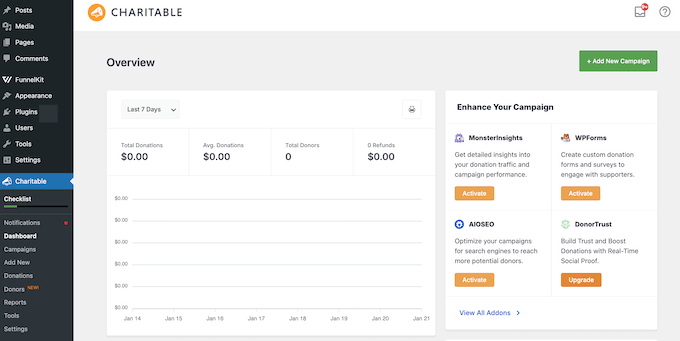
Plus, unlike many other platforms that charge ‘success fees,’ WP Charitable doesn’t charge any platform transaction fees. This means more of your donors’ money goes directly toward your mission.
You also don’t have to worry about a third-party service changing its terms or losing access to your database, because everything is stored securely on your own server.
My Experience
I wanted to see if WP Charitable truly delivered on its promise of being simple, especially for smaller organizations. I know the nonprofit space on WordPress can often feel overwhelming with complex solutions that require a ton of setup.
After installing the free core plugin from the WordPress repository, I had a test campaign up and running within minutes using their professionally designed campaign templates.

These templates let you create high-converting donation pages immediately, ensuring your campaign looks professional without spending precious funds on a designer.
WP Charitable’s visual campaign builder is another standout feature. Its drag-and-drop interface lets you add donation buttons, progress bars / fundraising thermometers, and social sharing links with a live preview.

Beyond the design, the backend donor management tools are excellent.
Unlike other plugins that only record transactions, WP Charitable provides a dedicated donor management area where you can view a complete giving history for every supporter.

You can easily search, filter, and export your donor lists, making it easy to track your most frequent contributors.
To save time on administration, I also enabled WP Charitable’s automated email features. WP Charitable sent PDF donation receipts to my test donors automatically, saving me time and effort.

In my experience, WP Charitable is the best choice for WordPress users who want a fast, integrated system that simplifies both the donor’s experience and the organization’s backend management.
Why I Recommend WP Charitable: This plugin is the most comprehensive fundraising solution for WordPress because it balances powerful features with a focus on maximizing your revenue.
The platform doesn’t charge any platform transaction fees on its premium plans, so 100% of every donation goes directly to your cause (minus standard bank processing fees).
WP Charitable also provides access to a library of conversion-optimized fundraising templates that are mobile-responsive and proven to increase donation completion rates.
2. Bloomerang – Best for Donor Retention

| Bloomerang Pros | ✅ Actionable donor profiles with Generosity and Engagement scores ✅ Intuitive interface makes donor management easy ✅ Real-time analytics to track campaigns ✅ Offers insights into donor engagement and retention strategies ✅ Integrates directly with Mailchimp for actionable engagement insights |
| Bloomerang Cons | ❌ The mobile app lacks full functionality compared to the desktop version ❌ Initial setup can be time-consuming for large databases ❌ Higher costs |
| Pricing | Starts at $40/month (billed annually) |
| Best For | Nonprofits focused on building long-term relationships and improving donor retention |
Bloomerang stands out as a full-fledged CRM (Customer Relationship Management) system, which means it acts as a centralized ‘memory bank’ for your nonprofit. While basic tools simply process payments, a CRM tracks every touchpoint, from email opens to event attendance. This gives you a 360-degree view of each supporter.
In this way, Bloomerang can help you build long-term relationships with every single supporter you have.
My Experience
I tested Bloomerang on a demo site, specifically focusing on its donor retention features. I found that the platform absolutely delivered on its promise of turning donor data into insights you can actually use.
When I pulled up a donor’s profile, it wasn’t just a basic list of gifts. The system actively displayed Generosity and Engagement scores that immediately told me whether this person was likely to give again or could potentially increase their donation amount this year. This is a huge time saver.
Bloomerang also integrates with Mailchimp, so you can get engagement insights to create targeted campaigns. This connection between donor behavior and email marketing felt completely seamless during my testing, which is exactly what nonprofits need.
After exploring the main dashboard, I found the real-time reporting especially valuable for tracking fundraising performance. These powerful analytics help your organization spot trends and adjust your overall strategy quickly before your campaign loses momentum.
Overall, Bloomerang is an excellent fit for nonprofits that want to focus on nurturing deep, lasting donor relationships rather than just managing transactions.
Why I Recommend Bloomerang: This platform absolutely excels at turning raw donor data into solid retention strategies. It provides clear, immediate insights that help you build lasting supporter relationships without the guesswork.
3. Donorbox – Best Donor Management Software for Quick Setup and International Reach

| Donorbox Pros | ✅ Simple setup process gets you collecting donations fast ✅ Clean, mobile-optimized donation forms ✅ Peer-to-peer fundraising built in ✅ Detailed donor history for relationship tracking ✅ Supports multiple currencies and languages for global donors ✅ Connects with over 2,000 apps through Zapier |
| Donorbox Cons | ❌ Limited branding options on free forms ❌ Advanced analytics require third-party tools ❌ Zapier integrations may add extra costs |
| Pricing | Free (with 2.95%-3.95% transaction fees) or $150/month (Pro plan with lower fees) |
| Best For | Small nonprofits that need to start fundraising immediately with minimal setup time |
Donorbox is a versatile fundraising solution that makes donation management simple for organizations of all sizes. It’s excellent at supporting international donors.
In my opinion, Donorbox really stands out for removing technical barriers so you can start collecting donations quickly and efficiently.
My Experience
I approached testing Donorbox from the perspective of a small nonprofit that needs to start collecting donations right now with minimal technical fuss.
To start, I got Donorbox’s WordPress plugin up and running without any complicated configuration steps at all.

Within minutes of completing the setup, I’d created a donation form that perfectly matched my site’s design.
Unlike some other platforms that limit your currency options, Donorbox accepts donations from international supporters in their local currencies. This removes a major barrier, especially for organizations with a global reach or a diverse, international donor base.

In addition, the peer-to-peer fundraising feature proved even more useful than I initially expected. Supporters can easily create personalized fundraising pages and share them with their networks, increasing your organization’s reach organically with minimal effort.
The basic donor management tools should be enough for smaller campaigns, although larger organizations might need to connect Donorbox to an external CRM for deeper analytics.
Finally, the Zapier integration is great because it lets you connect to thousands of other tools to automate your campaign management.
Overall, Donorbox is a great fit for nonprofits that want to start accepting donations quickly without a high upfront cost or long setup time.
Why I Recommend Donorbox: This tool successfully removes all the technical barriers to donation collection. Plus, I love that it supports international donors so effectively.
4. DonorPerfect – Best for Comprehensive Campaign Management

| DonorPerfect Pros | ✅ Customizable fields let you record detailed donor history ✅ Automatic thank-you letters save hours of manual work ✅ Integrated payment processing for recurring donations ✅ Event management features help coordinate fundraisers ✅ Advanced reporting tools track campaign performance clearly ✅ Mobile app gives you donor access anywhere |
| DonorPerfect Cons | ❌ User interface feels outdated compared to some newer platforms ❌ The reporting feature is less intuitive to navigate ❌ Data migration from other systems may take significant effort |
| Pricing | Contact DonorPerfect for a personalized quote |
| Best For | Nonprofits that need a scalable solution to manage the entire donor relationship from first contact through repeat giving |
DonorPerfect stands out as a complete donor management system that truly handles every single aspect of your nonprofit operations.
It’s specifically designed for organizations that want one unified platform to manage donors, events, and fundraising campaigns all in one centralized place.
My Experience
During testing, I was impressed that DonorPerfect actively tracks every single touchpoint with supporters, from their very first gift through to ongoing volunteer work and event attendance.
Plus, its customizable fields gave me complete control over donor data. This meant I could easily track volunteer hours alongside donation history, which is something that most basic donation tools simply can’t handle.
Going further, the automatic thank-you letters alone saved me hours of manual work during my testing. I was able to spend that time creating personalized templates that felt genuine rather than generic.
Compared to some of the newer platforms I’ve tested, DonorPerfect’s main desktop interface does feel a little dated. However, I found that the mobile app works surprisingly well for quickly checking donor information when you’re on the go at an event or heading into a meeting.
After using DonorPerfect to handle complex, comprehensive donor tracking, I can clearly see why so many larger nonprofits choose this system. It successfully manages complicated data relationships that simpler tools may struggle to handle.
Why I Recommend DonorPerfect: This system works really well for nonprofits that manage multiple campaigns, fundraising appeals, and large-scale events. In particular, the customizable fields help you track detailed, complex donor relationships very effectively.
5. GiveWP – Best Donor Management Software for WordPress-Native Control

| GiveWP Pros | ✅ Everything lives in your WordPress dashboard ✅ Full ownership of donor data ✅ Customizable donation forms match your brand ✅ Recurring donations with flexible schedules ✅ Works directly with PayPal and Stripe ✅ Extensive add-on library for extra features |
| GiveWP Cons | ❌ Advanced features locked behind paid addons ❌ Limited offline donation recording ❌ Requires WordPress knowledge for setup |
| Pricing | Free (Lite), Premium starts at $149/year |
| Best For | Nonprofits that want complete control over their donor data and fundraising pages without relying on external platforms |
While many WordPress plugins focus on simple donation collection, GiveWP acts as a powerful ‘mini-CRM’ directly inside your WordPress blog or website.
It’s designed for established nonprofits that have outgrown basic forms and now want detailed data on donor behavior.
In particular, one of GiveWP’s best features is its built-in reporting. This provides visual charts and granular filters to help you understand exactly which campaigns are driving your growth.
My Experience
I found that GiveWP excels most when you need to understand the data behind your donations. It acts as a built-in CRM (Customer Relationship Management) system that tracks the entire lifecycle of a donor, so you can see their lifetime value and giving frequency over time.
While many tools provide a basic list of transactions, GiveWP offers visual, real-time charts that let you filter data by campaign, payment method, or date range.
This level of granular reporting is essential for larger organizations that need to make data-driven decisions about which fundraising appeals are actually working.
After setting up multiple campaign types, I was also really impressed by how customizable everything was. I created forms that matched my WordPress theme and branding perfectly, without having to write a single line of code.

GiveWP is also uniquely suited for organizations that handle ‘In Honor Of’ or ‘In Memory Of’ gifts. It features a robust Tributes add-on that transforms donations into collaborative acts of remembrance or celebration.
When a donor chooses to give in honor of someone, the system triggers an automated workflow designed to notify the family or the honoree.
You can configure the system to send customizable eCards immediately upon donation, allowing the donor to include a personal message. This is particularly valuable for memorial gifts, as it provides instant comfort to grieving families, letting them know a gift has been made in their loved one’s name.
Why I Recommend GiveWP: This plugin gives you complete data ownership and control, right within WordPress. It also offers extensive form customization without relying on external dependencies.
6. Little Green Light – Best for Small to Medium-Sized Nonprofits

| Little Green Light Pros | ✅ Rich set of features specifically designed for donor relationship management ✅ Intuitive interface makes it easy for non-technical staff to use ✅ Strong reporting and analytics tools help measure fundraising success ✅ Efficient data entry processes minimize administrative workload ✅ Seamless integration with third-party tools like Constant Contact, Mailchimp and QuickBooks ✅ Comprehensive donor management system with customizable fields and event tracking |
| Little Green Light Cons | ❌ Not optimized for very large organizations with complex needs ❌ Limited number of built-in integrations, which may require third-party apps ❌ No free version, although a 30 day free trial is available for testing |
| Pricing | Starts at $45/month for up to 2,500 constituents |
| Best For | Small to medium-sized nonprofits that need a straightforward, all-in-one donor management system without overwhelming complexity |
Little Green Light successfully bridges the gap between those basic spreadsheets we all dread and the overly complex enterprise systems that are just too complicated for a small team.
It’s specifically designed for small to medium-sized nonprofits that need powerful features without the technical headaches that often come with them.
My Experience
During my testing, I approached Little Green Light from the perspective of a small, two-person development office. The clean interface immediately stood out to me as something that wouldn’t require extensive, expensive staff training, which is a massive bonus.
Unlike some more complicated platforms I’ve worked with, the data entry process does a great job at reducing your workload. I could quickly add new donor information, track ongoing pledges, and set up communication workflows without getting completely lost in complex menus.
After setting up a few sample donor profiles, the reporting tools delivered exactly what a small nonprofit truly needs. The clear analytics helped me quickly measure fundraising success without overwhelming me with a ton of unnecessary data points.
The bottom line is that this tool eliminates all the painful training that usually comes with rolling out donor management systems. For busy nonprofit staff, saving that time translates directly into more energy for the actual fundraising work that matters.
Why I Recommend Little Green Light: This software successfully reduces the learning curve for small nonprofit teams. It includes all the essential donor management tools you actually need.
Other Donor Management Tools I Tested
If you’re still exploring your options, here are a few other donor management tools that are worth mentioning.
These aren’t my top picks, but they can make sense in certain situations.
7. Keela – Best for AI-Powered Fundraising Insights

Keela combines smart AI technology with powerful CRM capabilities to help nonprofits make data-driven decisions.
This platform genuinely stands out by actively removing the guesswork from fundraising through intelligent automation and powerful predictive analytics.
| Keela Pros | ✅ AI tools identify likely donors and suggest optimal outreach times ✅ CRM, email marketing, and donation tools work together seamlessly ✅ User-friendly interface simplifies complex management tasks ✅ Efficient donor relationship management tools for retention and engagement ✅ Scalable solution that grows with your organization |
| Keela Cons | ❌ Advanced features require an understanding of AI tools ❌ Some users experience difficulties with real-time syncing across platforms |
| Pricing | Starts at $144/month for up to 1000 contacts |
| Best For | Nonprofits ready to use data-driven insights to make smarter fundraising decisions and automate donor engagement |
Why I Recommend Keela: This platform perfectly combines smart AI tools with practical donor management features. It truly helps you make better, more effective fundraising decisions based on real data, every single time.
8. Virtuous – Best Donor for Automation and Relationship Building

Virtuous is a dynamic platform that combines CRM, marketing, and fundraising tools to build meaningful donor relationships and drive engagement.
The platform truly stands out because it combines comprehensive donor management with built-in marketing automation, all within a single, unified system.
| Virtuous Pros | ✅ Beginner-friendly interface for managing donors ✅ Powerful automation handles repetitive tasks for you ✅ Syncs effortlessly with tools you likely already use ✅ Shifts the focus from simple transactions to real relationships ✅ Built to scale, so you won’t have to switch software as your nonprofit grows |
| Virtuous Cons | ❌ Limited real-time collaboration features for team-based tasks ❌ Limited ability to customize dashboards without technical support |
| Pricing | Contact for a quote |
| Best For | Nonprofits wanting to combine relationship tracking with automated donor communications in one platform |
Why I Recommend Virtuous: This platform beautifully combines donor management with marketing automation. It truly helps nonprofits build stronger relationships and improve engagement without time-consuming manual work.
9. GiveButter – Best for Grassroots Organizations

GiveButter provides an accessible, cost-effective fundraising solution with a strong focus on community engagement and seamless social media integration for nonprofits.
What really sets this platform apart is the fact that you can access powerful fundraising tools without monthly subscription fees.
| GiveButter Pros | ✅ Generous free plan with unlimited donation forms ✅ Built-in event ticketing and management features ✅ Easy social media integration for increased reach ✅ User-friendly design makes setup straightforward |
| GiveButter Cons | ❌ Performance issues with large-scale campaigns ❌ Limited reporting customization options ❌ Transaction volume handling may vary |
| Pricing | Free (Core features) |
| Best For | Small grassroots nonprofits that need comprehensive tools without monthly fees |
Why I Recommend GiveButter: This platform gives small nonprofits access to truly comprehensive fundraising tools for free. Plus, the social sharing features actively help your campaigns reach wider audiences naturally and effectively.
10. goDonate – Best for High-Volume Fundraising

goDonate is a specialized donation platform built specifically to handle large-scale fundraising campaigns for UK-based nonprofits.
If your organization manages national appeals or expects significant traffic spikes during televised events, this platform can process thousands of transactions without performance delays.
| goDonate Pros | ✅ Can handle over 50,000 donations per hour during major campaigns ✅ Fully optimized for the UK market with built-in support for Gift Aid ✅ Creates branded donation forms that match your organization’s identity ✅ Offers personalized, dynamic donation pages to boost engagement ✅ Accepts both one-time and monthly recurring donations ✅ Reduces donor friction with fast, one-click payment options ✅ Supports multiple payment methods, including PayPal, Apple Pay, and Google Pay |
| goDonate Cons | ❌ May require technical expertise to fully personalize donation pages ❌ Limited focus on peer-to-peer fundraising features |
| Pricing | Contact goDonate for a personalized quote |
| Best For | Large nonprofits and organizations running major fundraising appeals that need to process thousands of donations quickly and reliably |
Why I Recommend goDonate: This tool works best for established, UK-based nonprofits that regularly run major campaigns. It consistently handles high donation volumes that would likely crash or seriously slow down other platforms.
Overall, goDonate is the right choice for organizations that need industrial-strength donation processing and simply can’t afford technical failures during their most important appeals.
What Is the Best Donor Management Software?
Based on my testing, I believe WP Charitable is the best donor management software for most nonprofits.
I love that it provides a user-friendly, WordPress-based platform that expertly handles campaign creation, multiple payment gateways, and donor communication without ever overwhelming smaller teams.
If you’re already using WordPress, then WP Charitable is the simplest way to get complete ownership of your donor data.
However, choosing the ‘best’ option really depends on your exact needs. That said, there are two other donor management systems that I highly recommend:
- If you want to retain donors and boost engagement over the long term, then Bloomerang is truly ideal. Its actionable donor profiles and smart engagement scoring immediately tell you who to reach out to next.
- If you’re an established nonprofit that needs comprehensive features like full event management, advanced reporting, and reliable mobile access, DonorPerfect offers a full-featured, scalable solution that’s proven to handle complex operations.
Donor Management Software FAQs
Choosing the perfect donor management system is a major decision, so I’m not surprised if you still have some questions.
After testing all these different platforms myself, I’ve gathered the most common issues and concerns that people bring to me. My aim is to clear up any confusion so you can confidently pick the best tool to support your mission.
What is donor management software?
Donor management software helps your nonprofit track every single donation, effectively manage all your donor relationships, and automate communication tasks like sending timely thank-you emails and receipts.
Do I need donor management software for a small nonprofit?
In my experience, the answer is a definite yes. Even small organizations can benefit from having organized donor data, automated receipts, and the ability to track giving patterns over time.
Relying on spreadsheets might work for the first year, but as soon as you start getting repeat donors or run multiple campaigns, that data will become disorganized and start costing you time and potential donations.
By investing in a donor management system early, you can save your small team a ton of manual admin work, so you can focus on building those all-important donor relationships.
Can I use donor management software with WordPress?
Yes! I’m glad to say that platforms like WP Charitable and GiveWP integrate directly with WordPress.
This is a huge benefit because it keeps everything clean, giving you full control over your donation data and ensuring your forms seamlessly match your site’s design. In fact, I always recommend using a native plugin solution where possible because it simplifies your tech stack.
What’s the difference between a donation plugin and donor management software?
This is a great question I get all the time. Simply put, donation plugins focus mainly on collecting gifts and processing transactions right on your site.
Meanwhile, donor management software does much more. It tracks the full donor relationship, manages engagement history, and provides the powerful analytics you need to make smarter fundraising decisions.
I always advise people to start with a great donation plugin, but plan to upgrade to full donor management software as soon as they start growing, and need to understand why people are giving.
How much does donor management software cost?
The cost varies widely depending on the platform’s complexity and scale. You can find excellent free options like WP Charitable and GiveButter that cover the basics, especially if you’re a smaller team.
Alternatively, more comprehensive platforms like Bloomerang often start at around $125/month for basic CRM features.
Remember to also factor in any transaction fees, setup fees, and potential hidden costs as your donor list grows.
Which donor management platform is easiest for beginners?
Based on my testing, both WP Charitable and Donorbox offer incredibly simple setup processes that truly let you start collecting donations within minutes, even if you don’t have any technical expertise.
If you’re already using WordPress, then I’d suggest opting for WP Charitable since it integrates directly with WordPress.
More Resources for Nonprofit Organizations
Choosing the right donor management system is a great first step. However, if you’re serious about growing your nonprofit, then you’ll need an entire toolset where everything works together perfectly.
To help you take the next steps, here are some helpful WPBeginner guides I recommend to strengthen your overall fundraising strategy:
If you liked this article, then please subscribe to our YouTube Channel for WordPress video tutorials. You can also find us on Twitter and Facebook.


